Android Visual Voice mail Plus SmS

Visual Voicemail Plus
Visual Voicemail Plus-1Visual Voicemail Plus-2
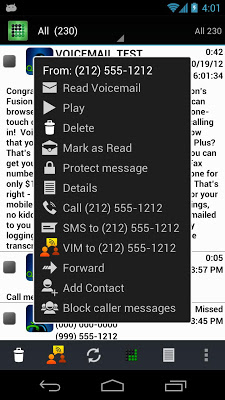
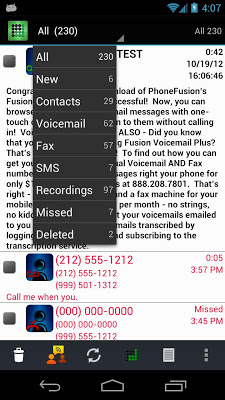
Visual Voicemail Plus gives you the power to manage your Voicemails and FAXES in a whole new way via your device, email, phone or computer. The most powerful and feature rich Visual Voicemail service available.
More features and options than carrier or other third party Visual Voicemail services and it’s FREE.
Read voicemail for a small monthly fee (OPTIONAL).
Respond to voicemail with a Voice Instant Message (VIM).
Setup caller specific greetings, Scheduled greetings (time/date based)
Take faxes on your voicemail or purchase a dedicated number for fax and voicemail so you don’t have to give out your private number!
PhoneFusion ONE customers can now send a fax from their Android device. Images and various document types supported. You can also use your PhoneFusion One fax feature to convert documents/Images to color PDF’s.
Get emails of your voicemails and faxes or notifications of missed calls when your phone never even rings due to a phone, signal, carrier or battery issue…
Forward, save or share your messages.
Block unwanted callers from leaving you messages.
Requires missed and unanswered calls to be forwarded to PhoneFusion so we can take your voicemails and faxes.
You can add other numbers and forward your missed calls to one place and get a unified voicemail box!
Offers seamless integration for PhoneFusion One customers for inbound/outbound calls, texts, account management, reporting and sending faxes.
Notes:
We REPLACE carrier voicemail with a more feature rich version on AT&T, Verizon, T-Mobile, Sprint and Solavei as well as others in the US and UK. Messages left on other services will still be accessible via those services but not via our Visual Voicemail app.
Visual Voicemail is defined as managing your messages Visually. Transcription is available as an OPTIONAL PAID service that enhances the free portion of the service. It is not required to use the free portion of the Visual Voicemail app.
Sorry it does not work with FLEX or prepaid carrier plans unless you have a PhoneFusion One number or a Dedicated Voice/Fax number from us.
Sorry, doesn’t work with pre-paid plans, such as T-mobile Flex-Pay, Simple Mobile, Family Mobile, and Virgin Mobile (it may work if your plan has forwarding), and most MetroPCS and Cricket users (It works for some of those with better plans). Those are CARRIER/PLAN restrictions because they do not allow forwarding..
To send a fax you need a PhoneFusion ONE number.
A PhoneFusion ONE number is a Unified Communications number where you can call multiple phones, transfer calls, records calls, conference, send and receive faxes, text and screen your calls. Never give out your private direct number to anyone again! You can get local or Toll-Free numbers or bring your own number in. This is an OPTIONAL PAID service.
Visual Voicemail is a free subset of our paid PhoneFusion ONE service.
Size : 1.8M
Current Version : 4.4.1.5
Requires Android : 2.2 and up

Android Mobile Number Tracker

Android Mobile Number Tracker

Android Mobile Number Tracker-1


Android Mobile Number Tracker-2

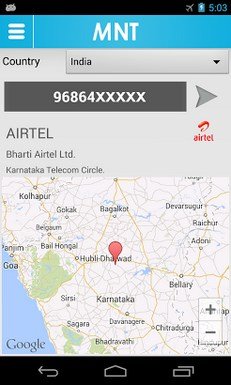
Get Information about the unknown caller.
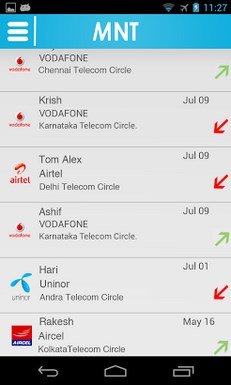
Are you getting calls from unknown number? Do you want to find from where that person is calling? Now you can use Mobile Number Tracker to find from which state/telecom operator a mobile number belongs to. It shows caller info during incoming call. You can also view the details of mobile number in the call log.
FEATURES:
- Locate phone number area and state.
- Find address from map.
- Analyze you call logs information
- View call logs along with operators information
- Sleek UI
- No Internet connection required
- Updated Mobile number database.
- Regular updates
- Shows Caller Information during the call.
- Customize Caller Info display duration
Supports USA and India. Other countries will be added soon.
The MNP ported numbers are not traceable by the app.
- This app cannot show you the physical location of the caller.
- MNT(MobileNumberTracker) may also use Google Analytics to collect anonymous usage data in order to help build improvements to the app.
Size : 4.6M
Current Version : 1.8.3
Requires Android : 2.2 and up

Android new Setalait GPS Compass Map 3D

AR GPS Compass Map 3D

AR GPS Compass Map 3D-1AR GPS Compass Map 3D-2
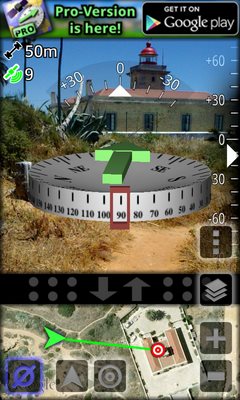
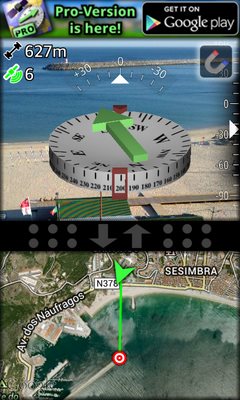
3D Compass and Waypoint Finder with Map and Augmented Reality Display!
This is the Free-Version. There is also a Pro-Version available. Please check my other apps, you can find it there.
Features (Summary):
* Augmented Reality display
* High precision and stability (special filter algorithm)
* Map with GPS Location
* Displays GPS information
* Measure the height of large objects
* Measure magnetic field strength (metal detector)
* Magnetic field strength warning (indicates magnetic influences)
* Geocaching: Easily define and find waypoints
* Share waypoints or your current location with other users
* Define waypoints by specifying latitude / longitude in various formats
* Define waypoints by a long-press on the map
* Define waypoints by specifying distance and bearing
* Real3D support!
Detailed description:
Augmented Reallity GPS Compass Map 3D displays a 3D compass that gets combined with the camera image. Your current location from GPS is shown on a separate map with adjustable size.
Unlike most other apps, the compass uses a very effective fusion and filtering algorithm to combine the values of the magnetic field sensor, the accelerometer and the gyroscope (if installed in your device) to achieve a maximum in precision and stability.
A magnetic field strength warning indicates the possible influence of metallic objects or power-lines.
You can define your own waypoints. In this case a green arrow on top of the compass always points towards the selected waypoint. (Geocaching is really fun with it :-)
New waypoints can be defined by a long-click on the map, by specifying latitude and longitude, or by specifying distance and heading from an existing waypoint.
You can also share your current location and the locations of your waypoints with your friends.
On devices with LG’s Real3D technology (e.g. the LG P920 Optimus 3D or the LG P720 Optimus 3D Max), the app features a 3D stereoscopic view of the compass and the camera image.
The app is still being developed further, so please feel free to send your comments or suggestions to the developers e-mail address provided below. Your feedback is highly appreciated!
Size : 833k
Current Version : 1.4
Requires Android : 2.2 and up
Android Augment 3D Augmented Reality

Augment – 3D Augmented Reality

Augment - 3D Augmented Reality-2


Augment - 3D Augmented Reality-1
Augment is a mobile app that lets you and your customers visualize your 3D models in Augmented Reality, integrated in real time in their actual size and environment. Augment is the perfect Augmented Reality app to boost your sales and bring your print to life. Add your own 3D models and custom trackers on Augmentedev.com
Size : 15M
Current Version : 2.6.1
Requires Android : 2.3.3 and up

Android Live wallpaper

Shake Them All! Live Wallpaper

Shake Them All! Live Wallpaper
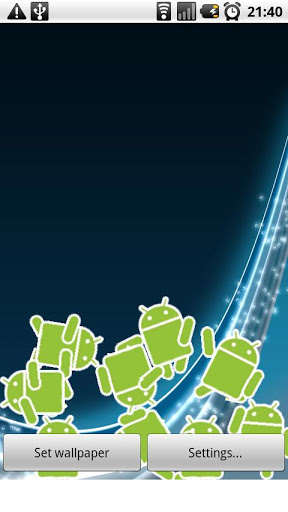
Live wallpaper using realistic physics engine and g-sensors to display Androids falling down your screen.
Androids react to gravity, touching, shaking your phone and even light and sound now.
THE RECORD AUDIO PERMISSION IS ONLY USED FOR THE ‘REACTION TO SOUND’ FEATURE.
This feature allow the app to listen to the mic and make the droids dance accordingly. It won’t record your conversations or anything in any case, and you can totally disable the feature from the settings.
No spying here…

ChainReact Free Live Wallpaper

Chain Reaction Game + Live Wallpaper.
Play Chain Reaction on your live wallpaper.
It is fun and looks beautiful.
Support using image background from gallery.
The default background is similar to HTC sense wallpaper.
** If you phone is slow, please do not download it. **
Hope you guy enjoy it.
*************************
How to make home screen like me?
1, ADW.LAUCHER
2, Black Glass ADW Theme
3, Fancy Widget
4, ChainReact Live Wallpaper

i phone application

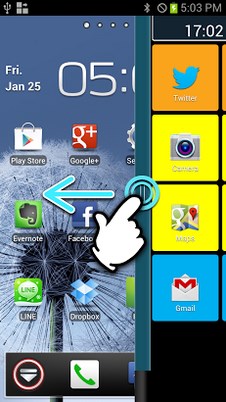
2ndHOME Launcher

2ndHOME Launcher-1


-What is ’2nd HOME’.
Anytime, anywhere and any situation, you can start up your favorite apps at once!
It’s so new! So easy and amazing!
No need to return to Home view every time you change apps.
That’s not all! The tools you always use will be conveniently together which used to be separate apps.
will meet your needs and relive your stress such as;
- I want to organize the home view.
With 2nd HOME, you can organize your home view
- I want to see what day it is today.
With 2nd HOME you can see it so easy
- I want to check the time while watching YouTube.
With 2nd HOME, you can do it
- When I play a game, I worry about the battery power.
you can check the battery power while playing
- My mobile phone is so slow.
2nd HOME can make it fast and smooth. All you need is just click the button
- I want to adjust the brightness of the display while watching Hulu.
2nd HOME can change the brightness while you watch Hulu!
-App Lock
Lock apps with a passcode when starting up.
Best for mail or SNS to protect your privacy.
-Registration and start up your favorite apps.
It’s launcher function.
-Memory cleaner
Clear memory to speed up your device response.
-Adjustment of display brightness
Adjust the brightness 1-5 levels.
.LED Light
.Bluetooth On/Off
.Wi-Fi On/Off
.Rotation of the view On/Off
.Switching mute/vibration
Q: Can I move the grip?
A: Yes, you can. Keep touching the grip and slide it to where you want without opening the window.
Q: It’s too dark to see the grip…
A: You can change the setting of grip to a lighter color.
Q: I cannot see the grip.
A: Check if the 2nd HOME icon is displayed at the status bar. If not, click the app icon and start up. If it is displayed, check the settings and see if “Use of Menu Grip” is OFF. It should be ON.
Q: Once unlock with App Lock, I cannot lock it again.
A: It will not lock again until the next screen off so you don’t have to enter the passcode so often.
Q: How can I change the background of App Lock?
A: It uses the wall paper of HOME window. Therefore if you want to change it, change the wall paper of your phone. Live wall papers are not shown in the background. In this case, first set another wall paper and after displaying lock window, set the live wall paper again.
Q: Is a version without ads available?
A: The pay version without ads is under consideration.
Q: Why does the icon of big light appear?
A: To prevent forgetting turn off the light, the icon appears while the LED light is on. You can turn it off by tapping the icon.
Q: What is the battery meter?
A: It is a function to display the battery power level with a bar in a corner. It also appears when other apps are working.
Size : 2.1M
Current Version : 0.9.9.1
Requires Android : 2.2 and up

android alert tone


android call tone


android screen server


android wallpaper

android wallpaper


android application


android Games

 PPSSPP is the best, original and only PSP emulator for Android. It runs a lot of games, but depending on the power of your device all may not run at full speed. Buy PPSSPP Gold to support the development.
Please note that ARMv6-based devices may have various kinds of issues, and more modern devices are recommended.
Some examples of compatible games (not all will run full speed on all devices):
Persona 2, Persona 3
Little Big Planet
Burnout Legends, Burnout Dominator
Final Fantasy : Crisis Core
Monster Hunter 2 Unite
Soul Calibur
GTA (slow on mobile)
Daxter
Lumines
Worms
and many more…
No games are included with this download, you will have to dump your own PSP games and turn them into .ISO or .CSO files, or simply play free homebrew games, which are available online. Put those in /PSP/GAME on your SD card / USB storage.
* PSP is a trademark of Sony, Inc

.Size : 11M
Current Version : 0.9.1
Requires Android : 2.2 and up
Get it now

Mad Race

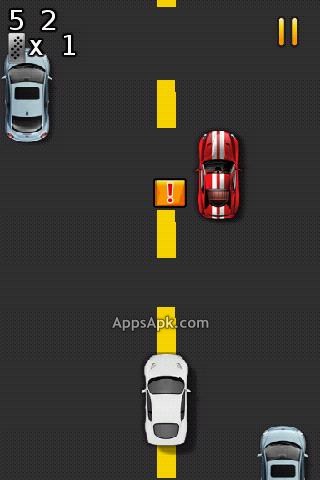
Take part in this addictive race, it offers touch and tilt based accelerometer controls in a classic arcade-style racing game.
Your goal is simple: go as far as possible on the highway. But not only driving takes all your attention, you should also collect items to activate the turbo and slow-motion mode.
How to drift: Tap screen to brake the car and then tilt your phone to left or right.
Please give us your feedback so we can add more cars, game modes and more cool stuff!


SpeedMoto

3d moto racing game with ecellent graphic effect!!
SpeedMoto is a 3d moto racing game with simple control and ecellent graphic effect.
- Just swap your phone to control moto direction
- Tap the screen to accelerate the moto
- In this game you can ride the motorcycle shuttle in outskirts, forest, snow mountain,bridge. More and More maps and motos will coming soon